Hours and billing

Hours, signatures and pro formas in one place - month by month.

Every month of every person at a client goes one way: hours from the client, the schedule check, signatures, the documents check and settlement - and from the settled hours a pro forma with a margin you see before you issue it.

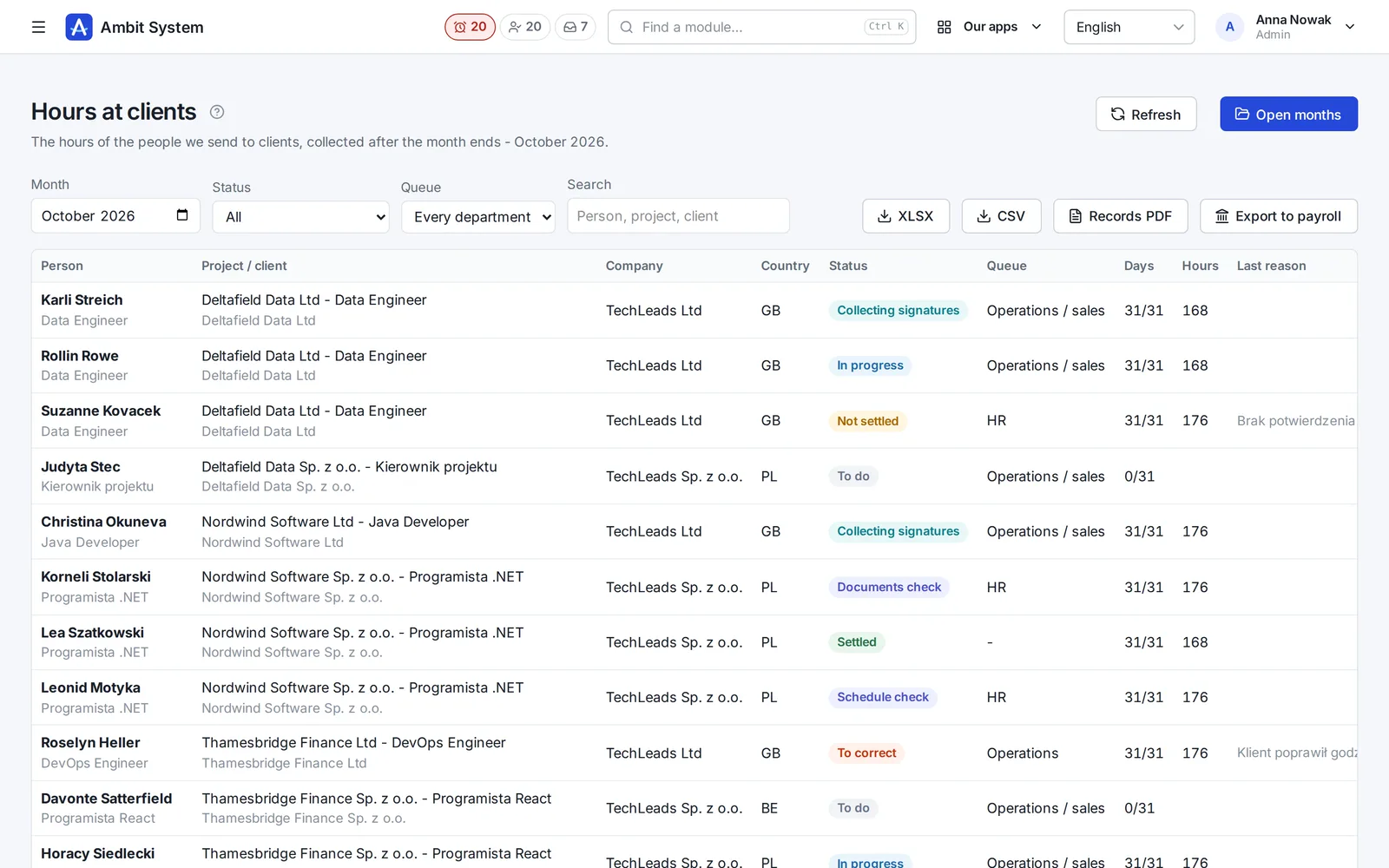
Hours at clients: each person's month with the project, company, country, status, department queue, days and hours.
Screens of the real system on made-up data.

How it goes today

Hours from e-mails, pro formas from five files

  • The client sends the hours by e-mail, in their own spreadsheet, each in another layout.
  • Workers' signatures are collected on paper and nobody knows which are missing.
  • A deduction for accommodation is entered from memory - without a consent to go back to.
  • The margin is worked out after the fact, when the pro forma has already gone out.

Hours and billing take every month along one path - with the hours, signatures, deductions and margin in one place.

How it works

The worker's month and the client's billing

The stages exactly as the system has them. Every handover between departments stays in the history; the steps a person takes outside the system are marked.

The worker's month

One month per person and assignment; every stage has its department.

  1. To do
  2. In progresshours from the client or the agency
  3. Schedule check
  4. Collecting signaturesthe documents are made by themselves
  5. Documents checkHR
  6. Settledexport to payroll

a correction goes back to operations or sales with a reason; not settled - with a reason
The client's billing

From hours and rates - revenue, cost, margin and the pro forma.

  1. Rateson the project position, from a day
  2. Costsapartment, utilities, fuel...
  3. Pro formaPF/number/year, PDF in PL/EN
  4. VAT invoice in KSeFoutside the system
  5. Resultsfrom the issued pro formas

The month

Every day of every person at a client

A day is a code (work, leave, sickness...) and, for hours, a start and a length; the system works out the night hours.

  • Default and own day codes; PL, DE, BE and NL holidays suggested
  • Overtime by class from the norm of the country of work, corrected by hand; limits only warn
  • Status with a department: operations, sales, HR - every handover in the history
  • The working time record as a PDF, one person per page
  • XLSX and CSV exports and an export to payroll
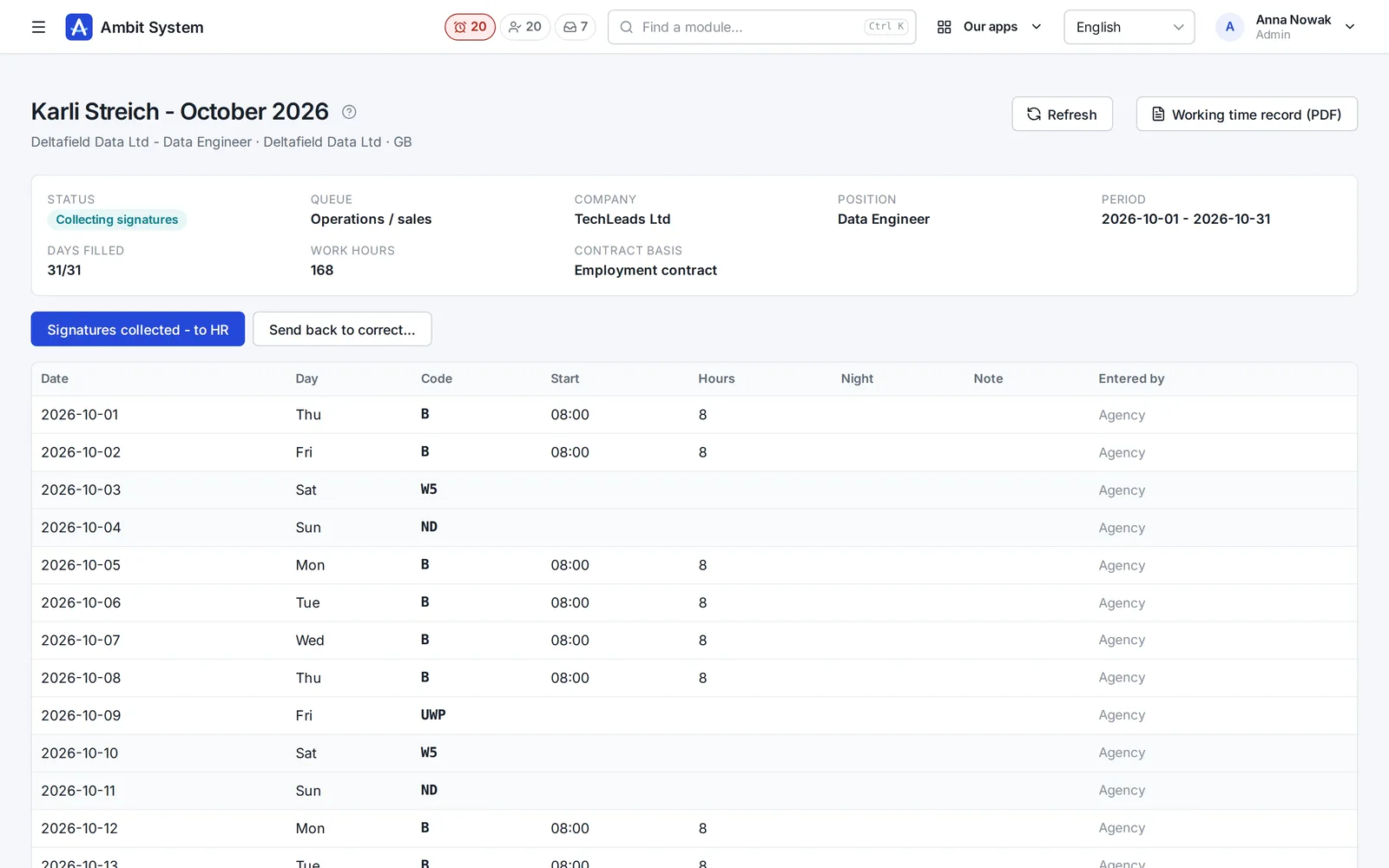
A worker's month: status, queue, company, position, period, hours, and below the days with their code, start and hours.
One person's month with its days.

A link for the client

The client enters the hours - no account needed

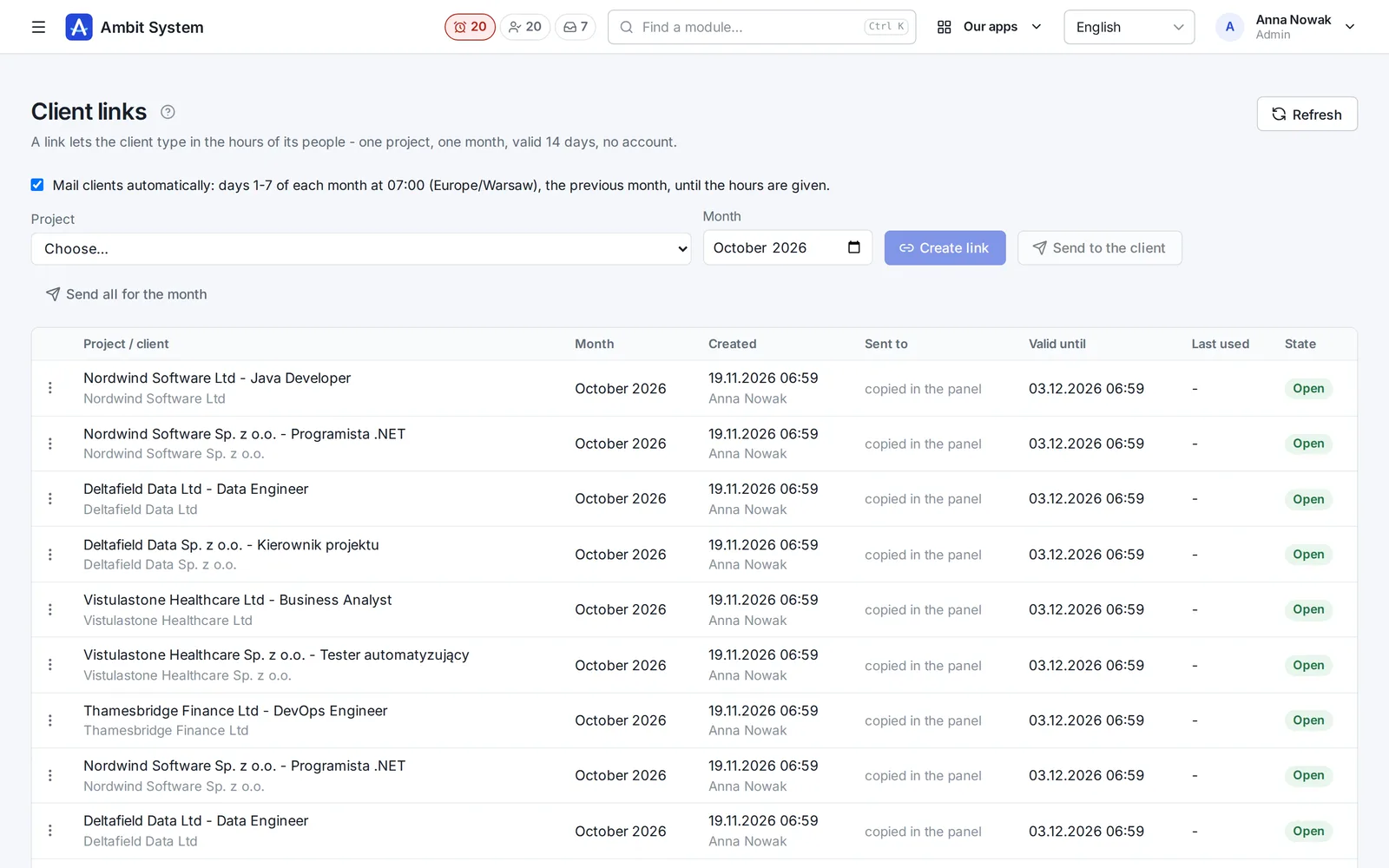
One link per project and month, valid 14 days; the client goes through their people step by step.

  • The link mailed automatically on days 1-7 of the month, at 7:00
  • The mail in the language of the client's country (10 languages), English otherwise
  • A new link withdraws the old one; only its hash is stored
  • A salesperson can enter the hours for the client - always signed with who did it
Client links: project, month, created, sent to, valid until and state of each link.
Client links and their state.

Documents to sign

Signed on a device, by link or on paper

A month's documents are made by themselves when it moves to collecting signatures - from templates you set.

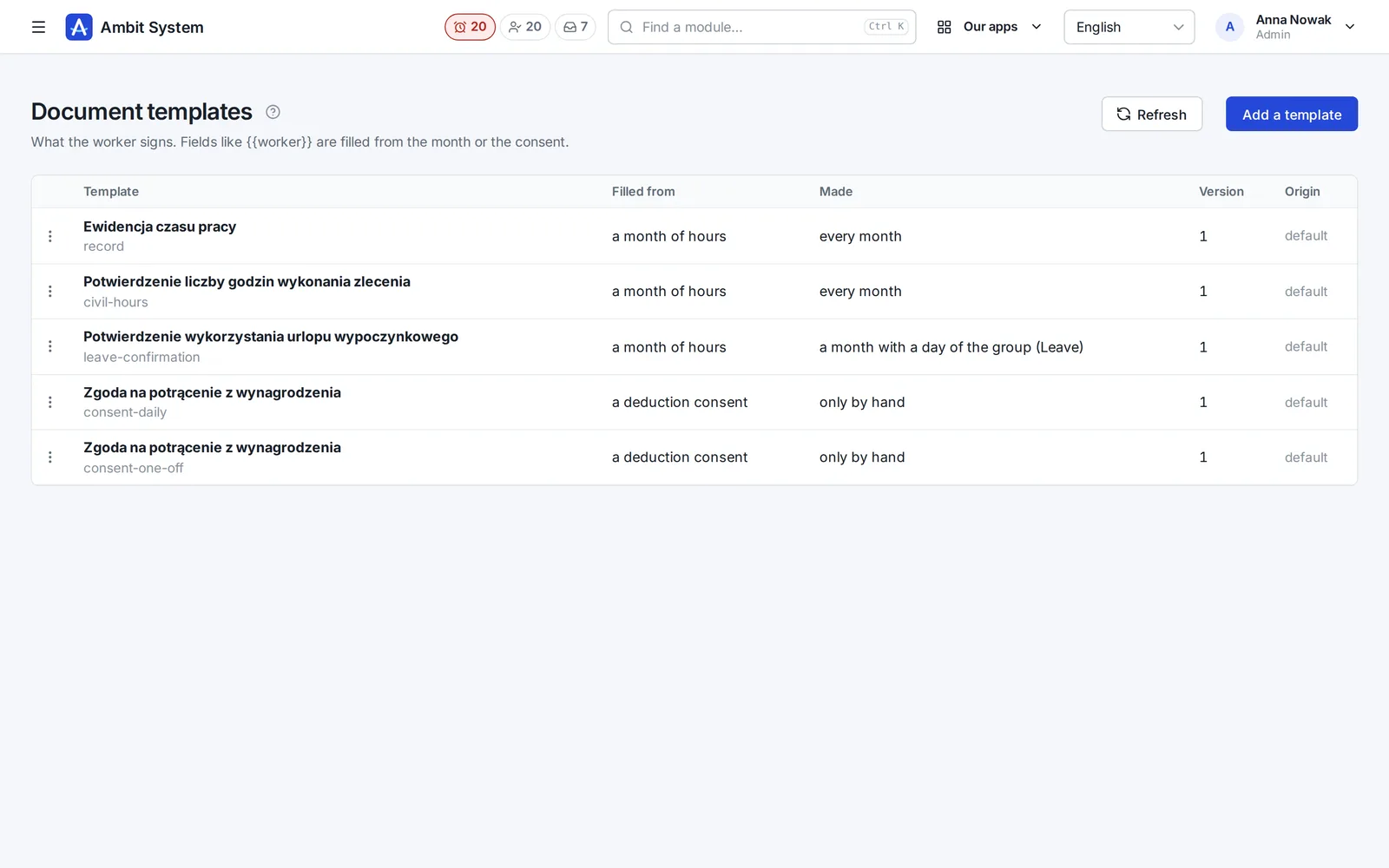
  • Templates: the record, the confirmation of mandate hours, the leave confirmation, deduction consents - and your own
  • The worker reads the PDF, agrees and signs with a finger, a mouse or a stylus
  • On the agency's device, by a one-use link valid 7 days, or on paper - confirmed, with a scan
  • HR verifies or rejects; a correction of the hours makes the old documents outdated
Document templates: name, what fills it, when it is made, version and origin.
Templates of the documents to sign.

Deductions

A deduction only on a signed consent

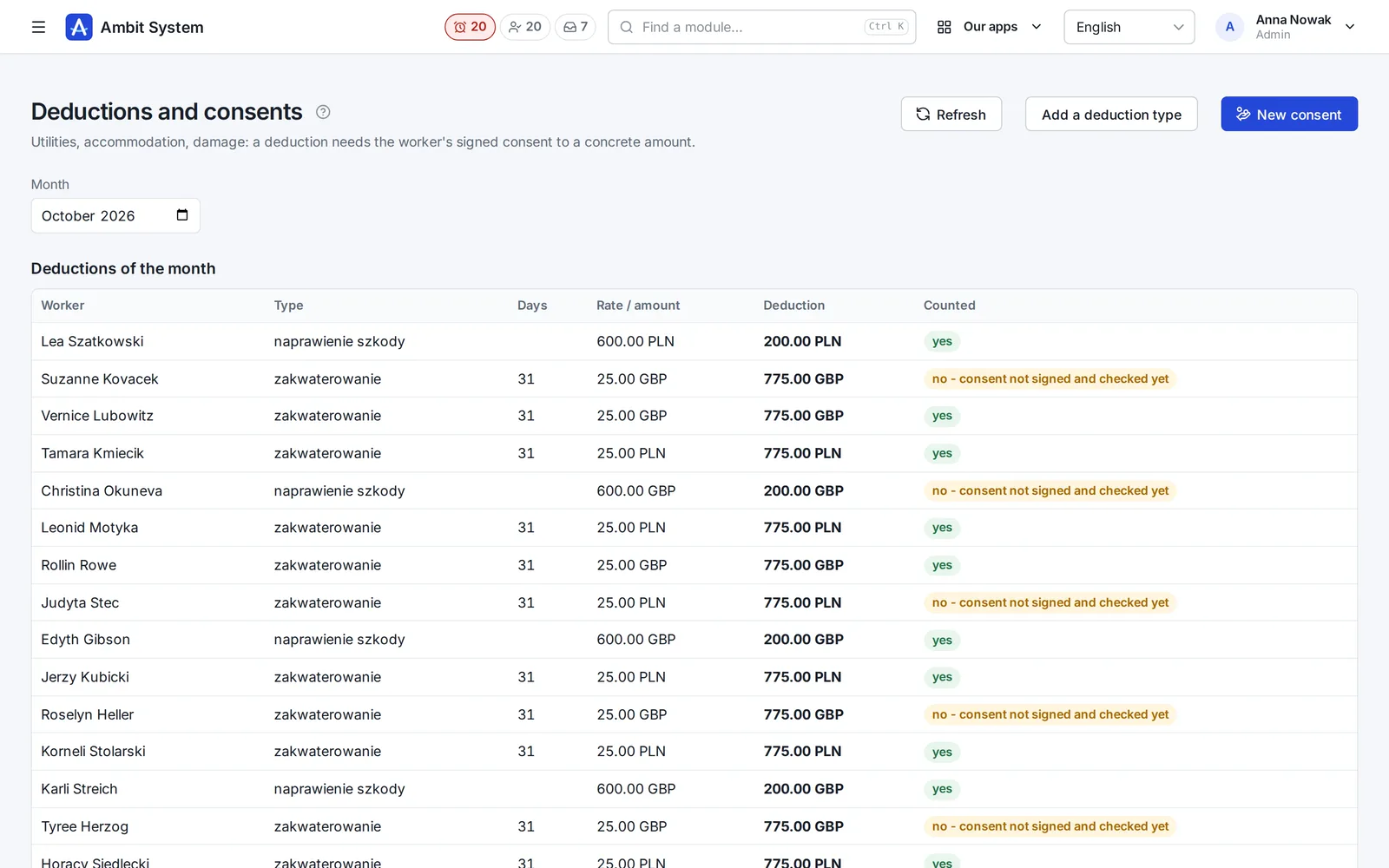
Utilities, accommodation, damage - a consent to a concrete amount with its own document, counted only once HR has verified it.

  • Default and own deduction types: daily, one-off, in instalments
  • Daily amounts × the days of the stay in an apartment or of the assignment
  • Without a verified consent the deduction does not count (art. 91 of the Polish Labour Code)
  • A "Deductions" sheet in the payroll export
The month's deductions: worker, type, days, rate, deduction and whether it counts - with the reason when the consent is not checked yet.
The month's deductions and their consents.

Rates and margin

The margin, seen before you issue the pro forma

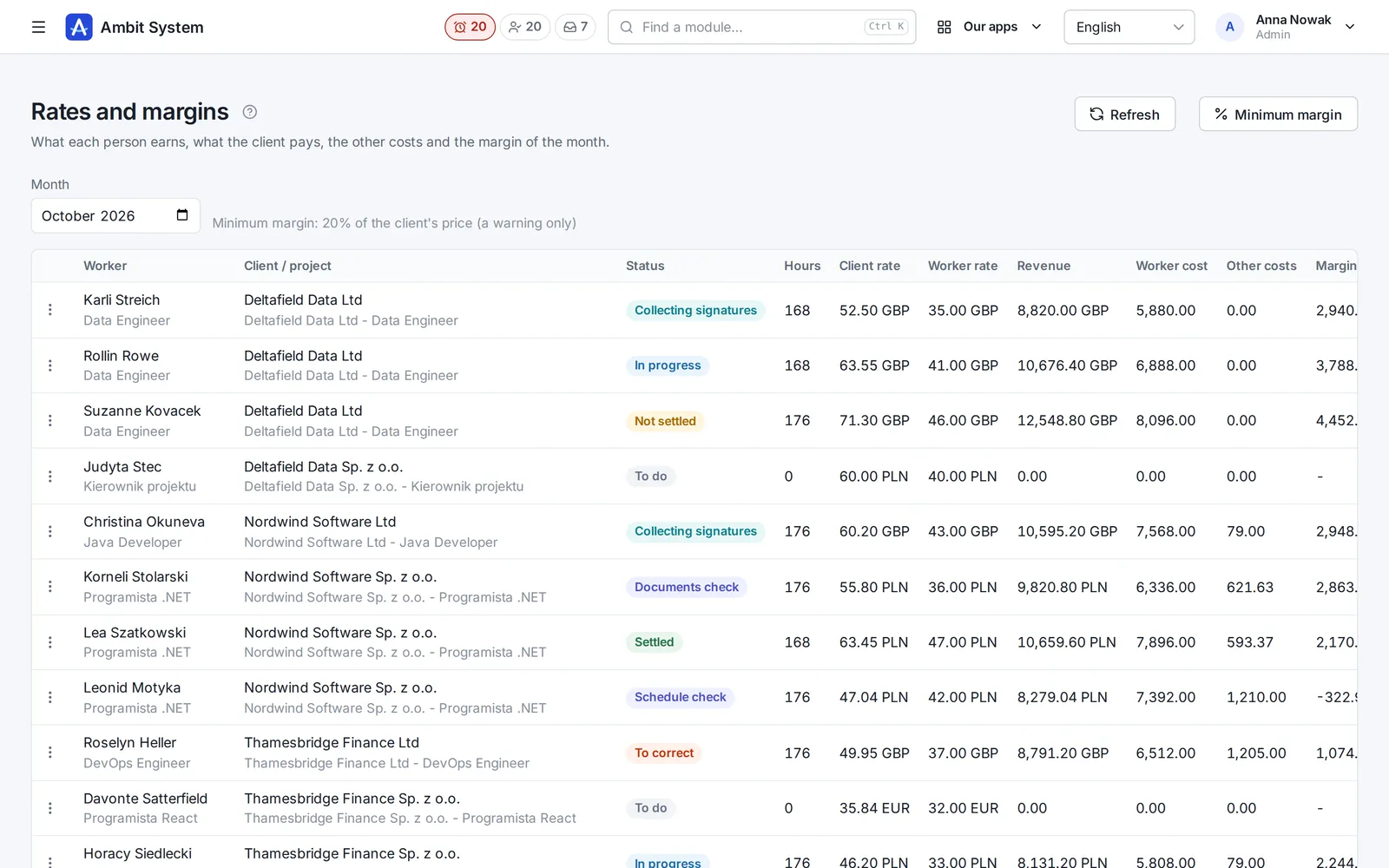
The worker's rate and the client's rate, other costs and the margin of every person in the month.

  • A rate on the project position from a day: per hour, a gross monthly salary, a monthly sum or cost + mark-up; a person can have an exception
  • Overtime: the worker's multipliers and the client's own overtime rates; employer contributions per company
  • Costs per person or project: monthly, per hour, % of pay, one-off
  • Margin in percent of the client's price; no rates - "no rates", never 0
  • The organization's minimum margin warns, it blocks nothing
Rates and margins: worker, client, status, hours, client and worker rate, revenue, costs, margin and margin in percent.
Rates, costs and margin of every person in the month.

Pro formas

A pro forma from the settled month

Hours × the client's rate, or a monthly amount, per client, issuing company and currency; you issue the VAT invoice from it in KSeF.

  • A number PF/number/year per issuing company
  • Domestic VAT, reverse charge or not subject to Polish VAT
  • A PDF in Polish or English, without the workers' rates, costs or margin
  • Outdated when the hours or rates change; cancelled with a reason frees its months
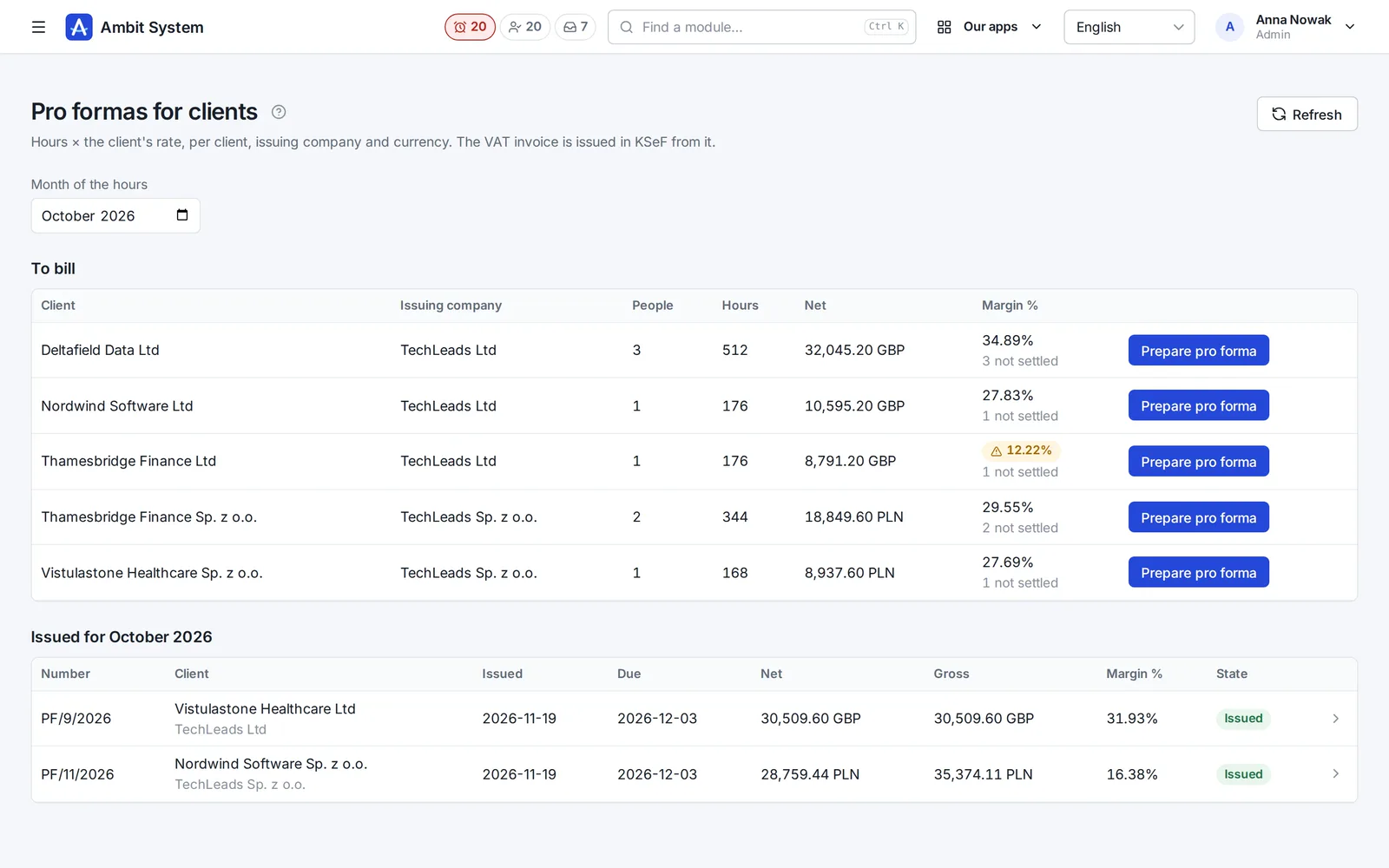
Pro formas for clients: those to bill with hours, net and margin, and those issued with their number, due date and amount.
To bill and issued in the month.
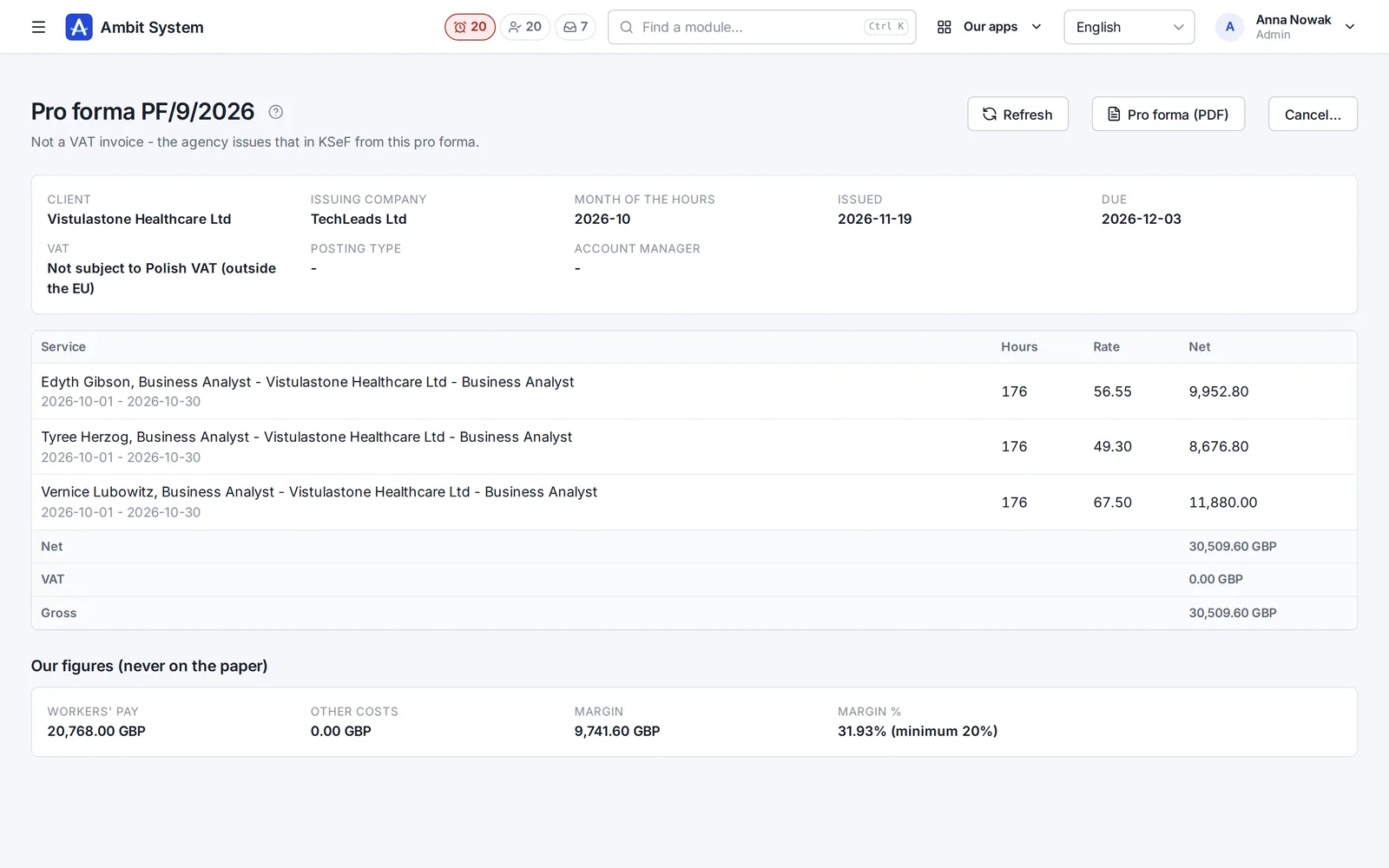
A pro forma: client, company, month, due date, VAT, the people's lines with hours and rate, and below the cost, margin and minimum - never on the paper.
A pro forma and the figures that never reach the paper.

Reports

Billing results and the recruitment funnel

What you earned on a project, a salesperson and a client - and how candidates move through recruitment.

  • Results from the issued pro formas: revenue, pay, costs and margin
  • By project, salesperson, client, company, month and currency
  • The recruitment funnel: applications, screening, interviews, assessments, offers, hires
  • Where applications come from, and an export to Excel
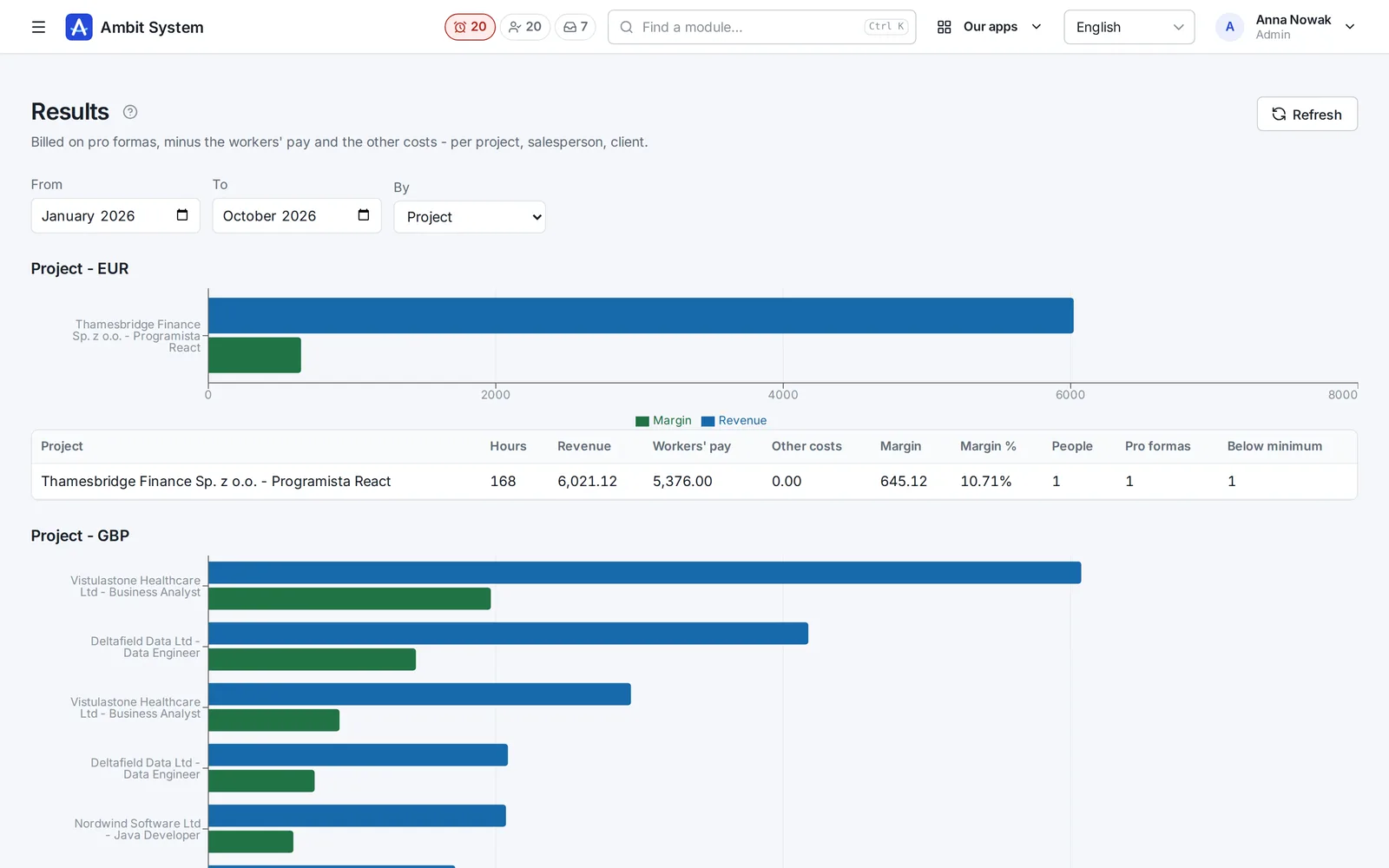
Results: the projects' revenue and margin on a chart and in a table with hours, costs and pro formas.
Billing results by project.
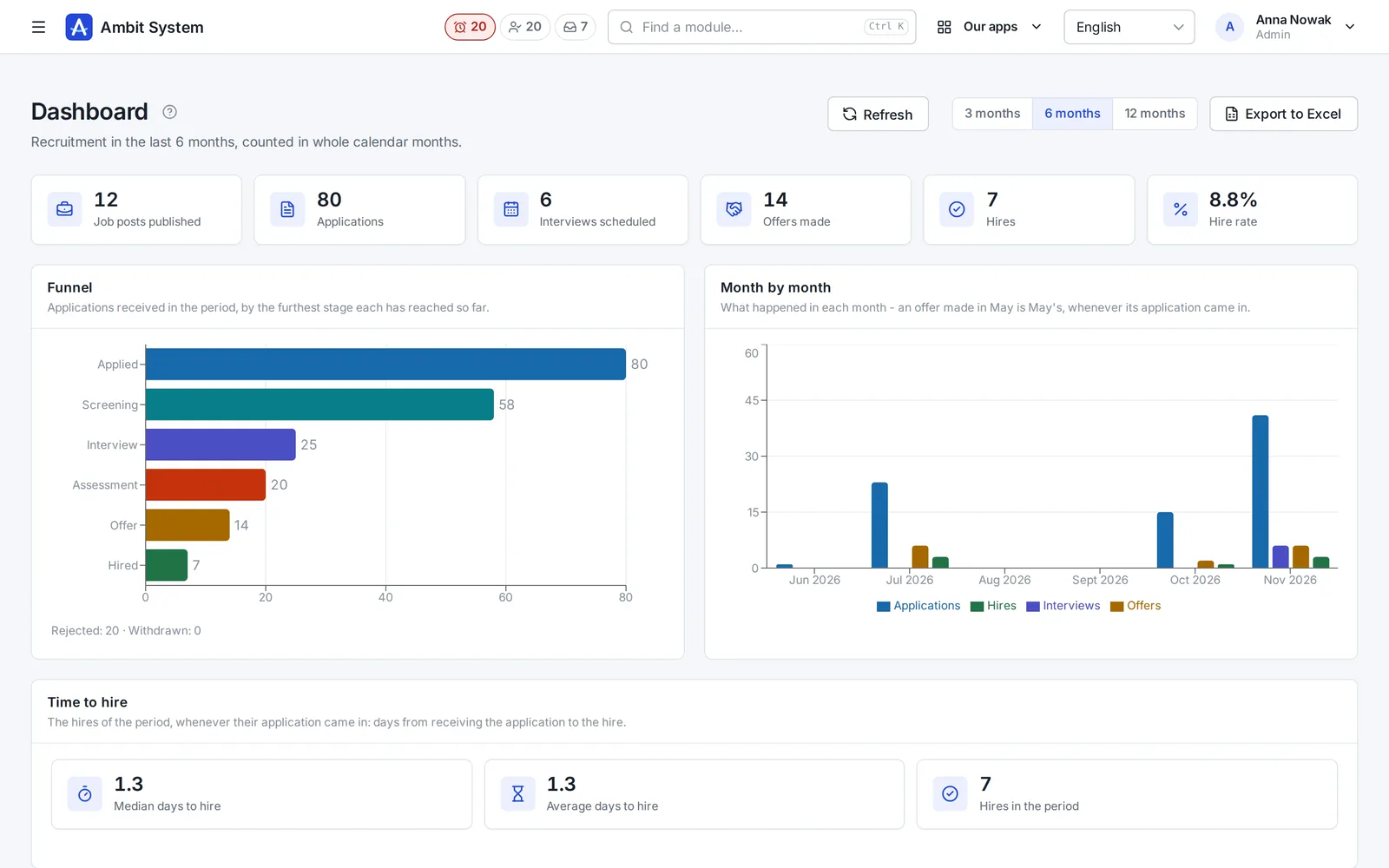
The dashboard: job posts, applications, interviews, offers and hires, the recruitment funnel and a month-by-month chart.
The recruitment funnel on the dashboard.

Said plainly

What it does not do yet

We would rather you knew before the demo than after it.

  • No qualified electronic signature: the signature is a handwritten one - drawn on the screen, or on paper and confirmed with a scan.
  • A pro forma is not a VAT invoice: you issue the invoice in KSeF from it.
  • No payroll calculation: the export hands the hours and deductions to payroll; taxes and net pay are not computed.
  • Amounts in different currencies are not converted - a margin across two currencies (or an hour against a month) is not worked out.
  • Overtime: no time off instead of the supplement and no German working time account; limits passed only warn.

Questions

Before you ask

Does the client need an account?

No. They get a link to one project and month, valid 14 days, and enter their people's hours step by step.

Is the worker's signature valid?

It is a handwritten signature drawn on the screen, with the document's PDF and its checksum - or a signature on paper confirmed in the panel, with a scan. A qualified electronic signature is not here.

Who sees rates and margin?

The administrator, HR, finance and the client's account manager - for their own clients only. Operations sees no money.

Does it work with Comarch Optima?

Yes - deductions reach Optima through an agent on the computer that runs it, and when the agent fails there is a sheet to enter by hand.

See it working on real screens

The demo has an agency with months at every stage, deductions, rates and issued pro formas.