For staffing and recruitment agencies

No more copying hours out of e-mails or building pro formas from five files.

The client enters hours through a link, workers sign documents on a device, and you prepare the pro forma from the settled month. Recruitment, worker records with permits, housing and Comarch Optima in one system - one price per company, in tiers of 1000 accounts.

From 450 € net a month per company, up to 1000 accounts. No per-person fee.

A smiling candidate shakes hands with the recruiter after a job interview in an office.

An agency today

Every step in a different place.

This is what the work looks like in most agencies we talk to:

  • The recruiter works in an ATS, the coordinator in Excel.
  • Apartments and beds in a notebook or a separate sheet.
  • Hours from the client arrive by e-mail and somebody types them in again.
  • The pro forma for the client is put together by hand from several files.
  • A worker's documents and the validity of permits - everyone keeps track on their own.

In Ambit System it is one path: from the sales opportunity through recruitment, posting, housing and hours to the pro forma - the same people and data at every step.

Deadlines

The system keeps an eye on the deadlines.

The dates already in the system become reminders and tasks - before anybody forgets them.

  • Every morning one digest per department: contracts, medical certificates, health and safety, permits, A1 and posting requirements, the end of a posting.
  • A deadline opens an HR case or a request in the department's queue - with the date, a priority and a link to the worker.
  • Temporary work limits in Poland and Germany and long postings, counted from the postings already in the system.
  • Somebody on leave - their stand-in gets the reminder; an overdue case goes to the supervisor.
  • The worker gets a "Deliver a document" link and sends a scan or a phone photo; HR takes it in with its validity date.
  • A log of who was told about which deadline, when and how - downloadable as a spreadsheet for an inspection.

What it does not do

  • It files nothing with the authorities - the agency still files A1, social security and permits.
  • It reminds of the dates entered in the system; a document without a date shows as missing data, it does not guess.
  • It does not remind of invoice payments - the system does not track whether an invoice is paid.

What it covers

All of an agency's work, not a set of modules.

You do not choose modules: you get everything below, including every module of the general version of Ambit System.

Sales

  • Opportunities on a funnel board, activities and tasks
  • Client companies, contacts and the account manager

Recruitment

  • Job descriptions and job posts in many languages
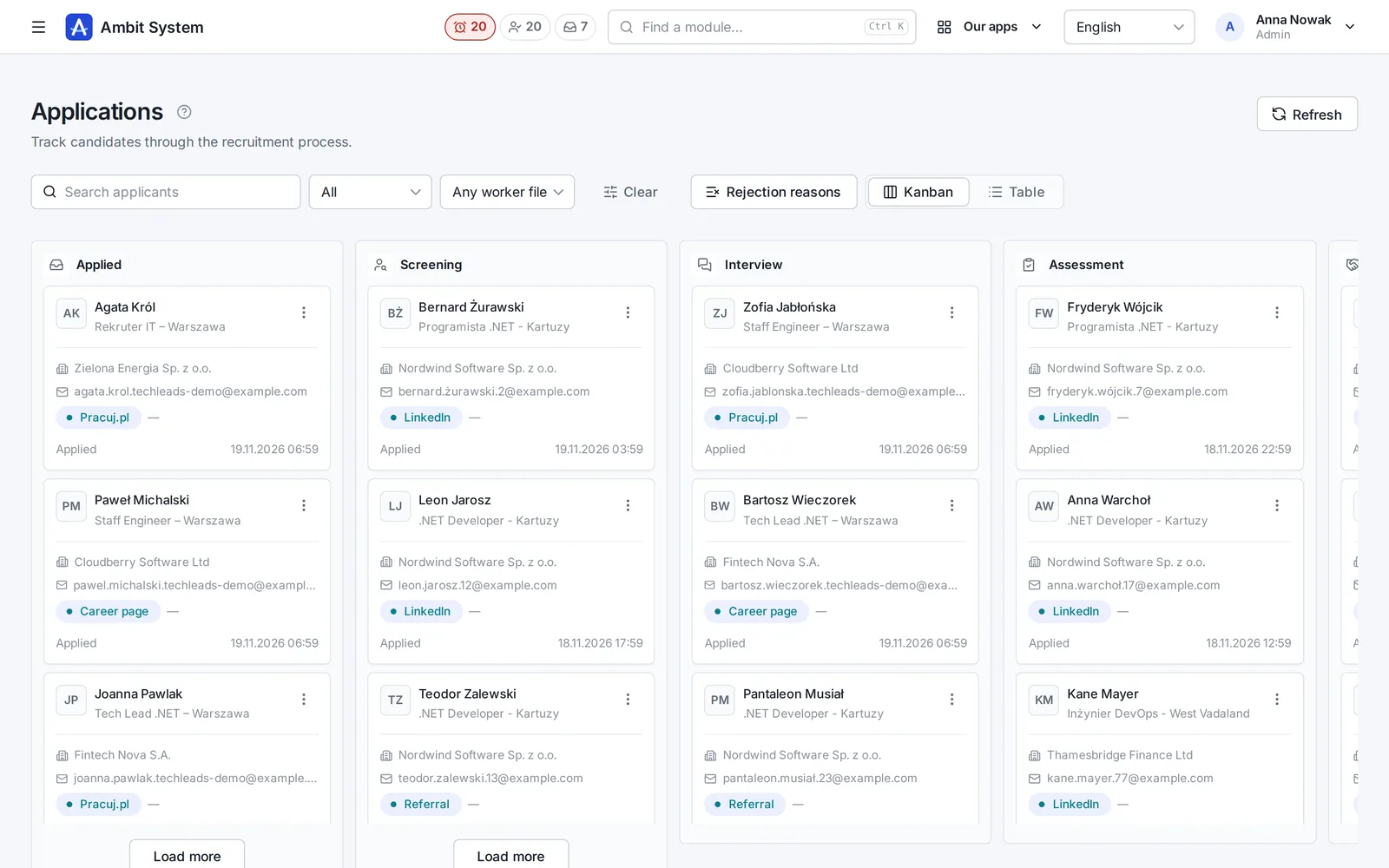
  • Candidates, applications on a kanban board and interviews
  • CVs as PDFs scanned for viruses, one per position
  • A GDPR consent register, processing periods and erasure
  • Messages to candidates: by hand and on a stage change, if you switch them on
  • A public job board and XML and JSON job feeds

Delivery

  • Projects with a contract, contacts and documents
  • Legal requirements by country and type of engagement
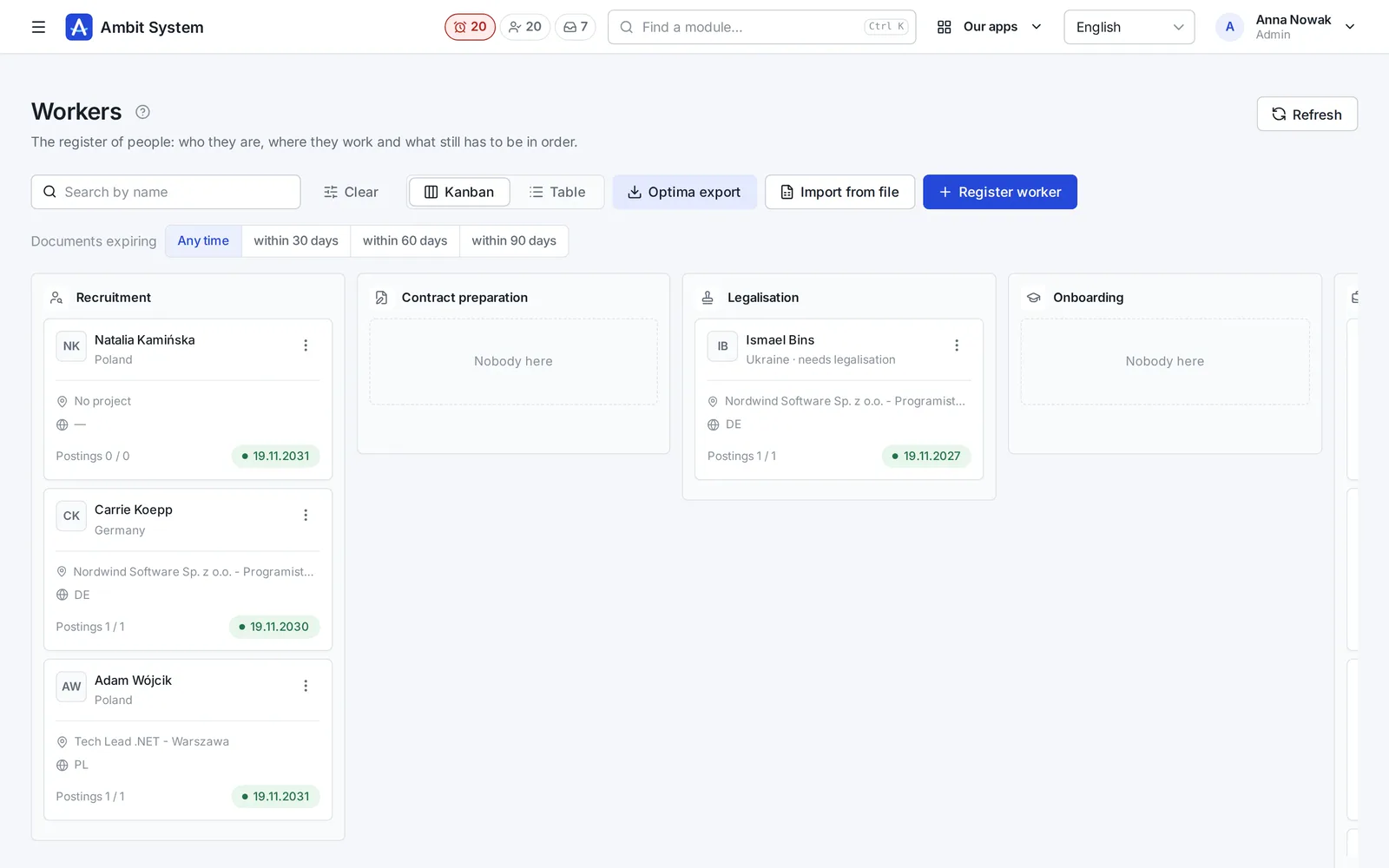
  • Worker records with stages, documents and permits
  • Assignments with A1 and Limosa; nobody works in two places at once
  • Apartments, rooms, beds and who stays where

Hours and billing

  • Hours at clients month by month, also through a link for the client
  • Documents to sign: on a device, by link or on paper with a scan
  • Deductions based on a signed consent
  • Rates on the position (hourly, monthly, cost + mark-up), overtime, costs and margin, and pro formas for clients
  • Reports: the recruitment funnel and billing results

Your company

  • The org chart, employment and time sheets of your own people
  • Tasks, forms, the Service Desk and a wiki
  • Fleet and equipment, purchase invoices from KSeF, settlement documents

Comarch Optima integration

  • An agent on the computer with Optima: you download the installer and generate its key yourself on the panel's Optima page
  • Workers from the list, with its filters, go into Optima's HR records; people Optima already has stay unchanged
  • A month's deductions go into Optima as its deduction components, once the types are matched
  • Without the agent, or when it fails: the workers list as an .xls file for Optima's HR import, and a month's deductions as an .xls to enter in Optima

Recruitment

From the client's order to a hired candidate - on one path

The position, job posts in several languages, applications from your own job board and interviews - with the history of every step and the candidate's consents.

  • One position, many job posts - one per language
  • Candidates on a board of stages: from the application to the hire
  • CVs as PDF checked by an antivirus, consents and retention periods
See recruitment on screenshots

Forms and the document creator

Contracts from the worker's data, without retyping into Word.

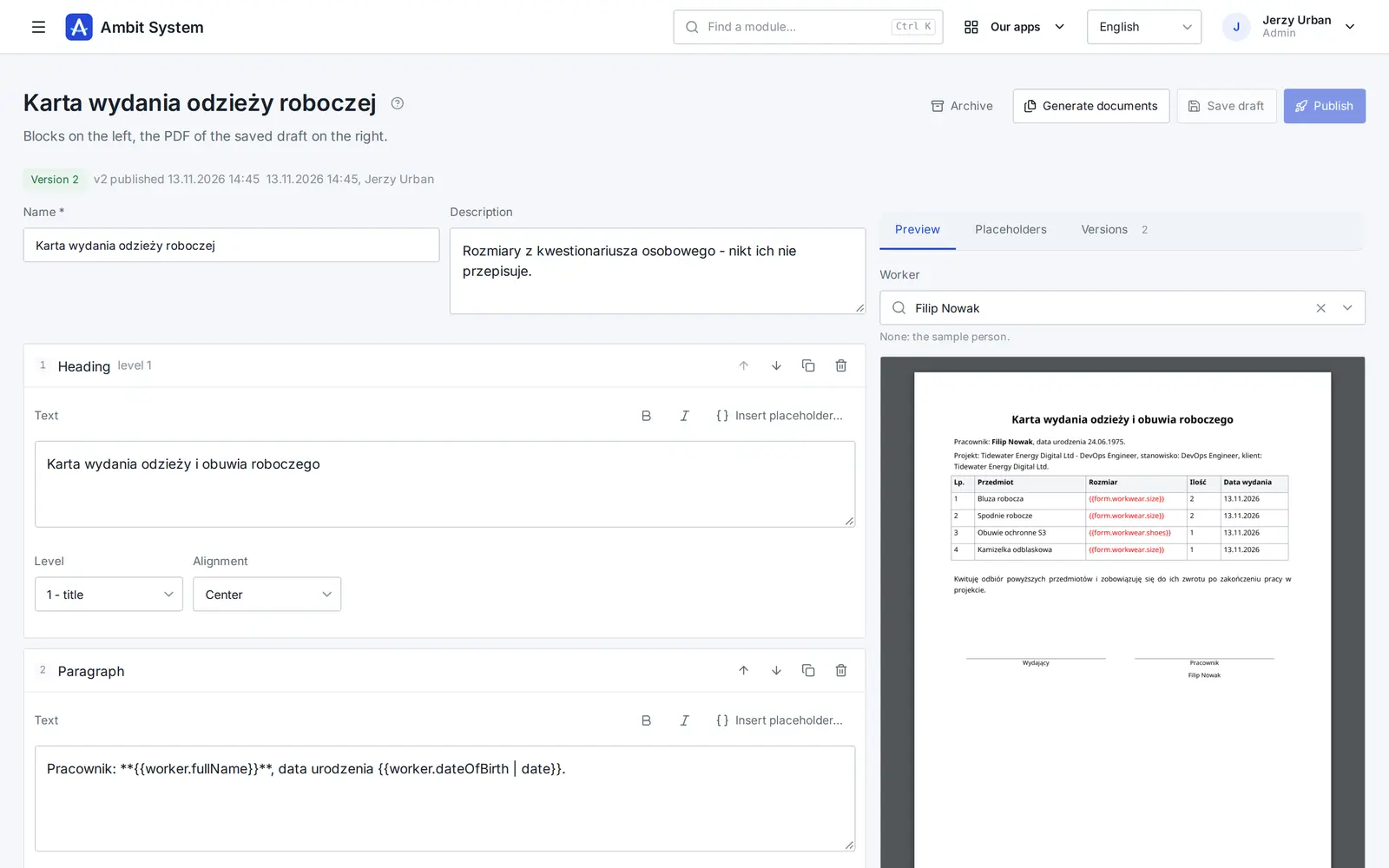
The worker fills in a questionnaire, and the system builds ready PDFs from the answers and the worker's file: the contract, the information about working conditions, the GDPR clause. Before anything is printed, you see who is missing what.

  • You build the forms yourself, no developer needed
  • Templates made of blocks, with the PDF preview beside them
  • Documents for 1-500 people at once, in the background
See how it works

Service Desk

Requests that reach the right desk - and get done

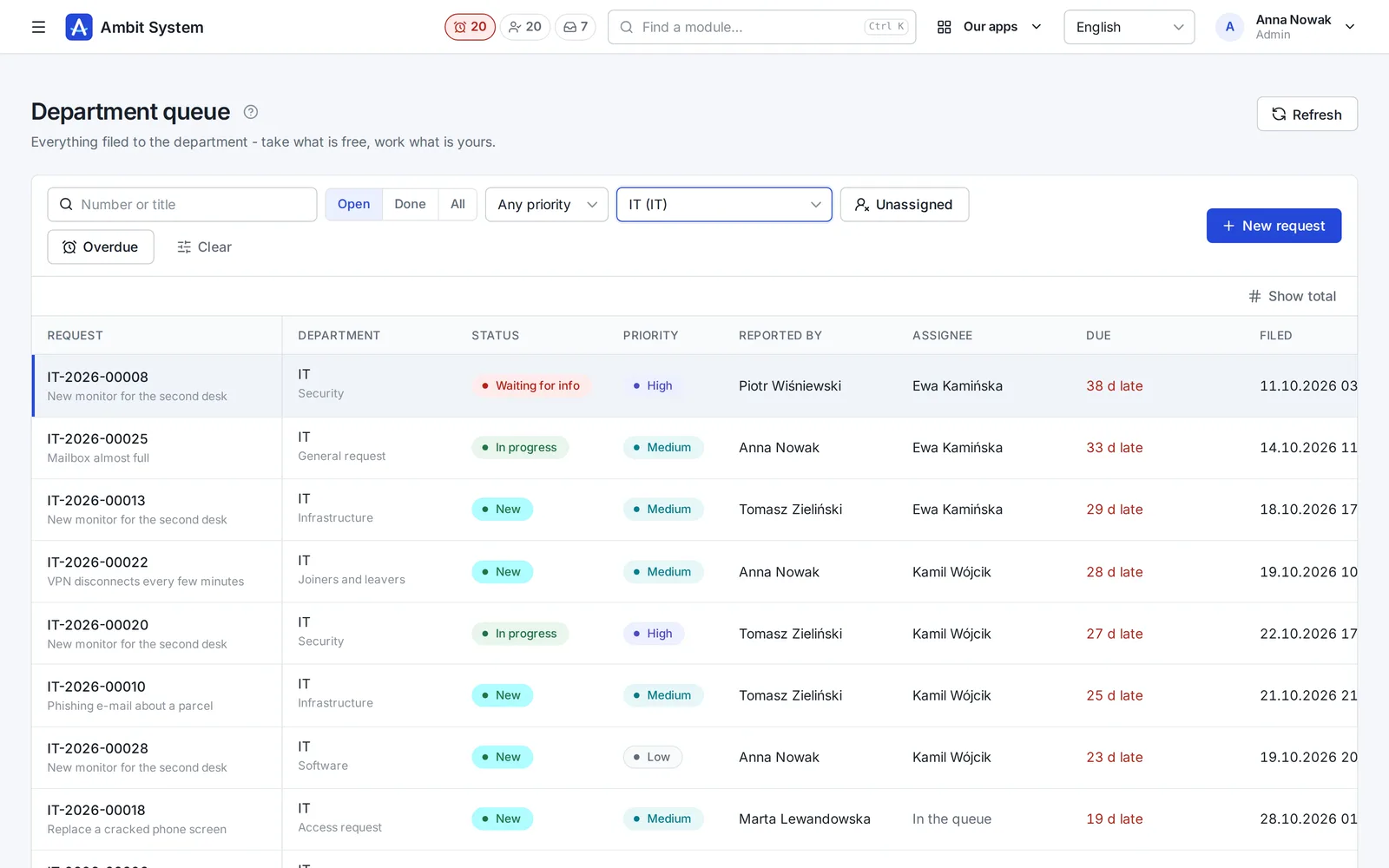
No more "I sent you an e-mail last week". Every request to IT, HR, finance or the office has a number, a person who has it and a due time.

  • A portal where staff pick what they need and answer a few questions
  • A queue per department: unassigned, overdue, due within 12 hours
  • A conversation, files and the full history on the request itself
See the Service Desk on screenshots

Sales

Every deal on one board - and the next step always planned

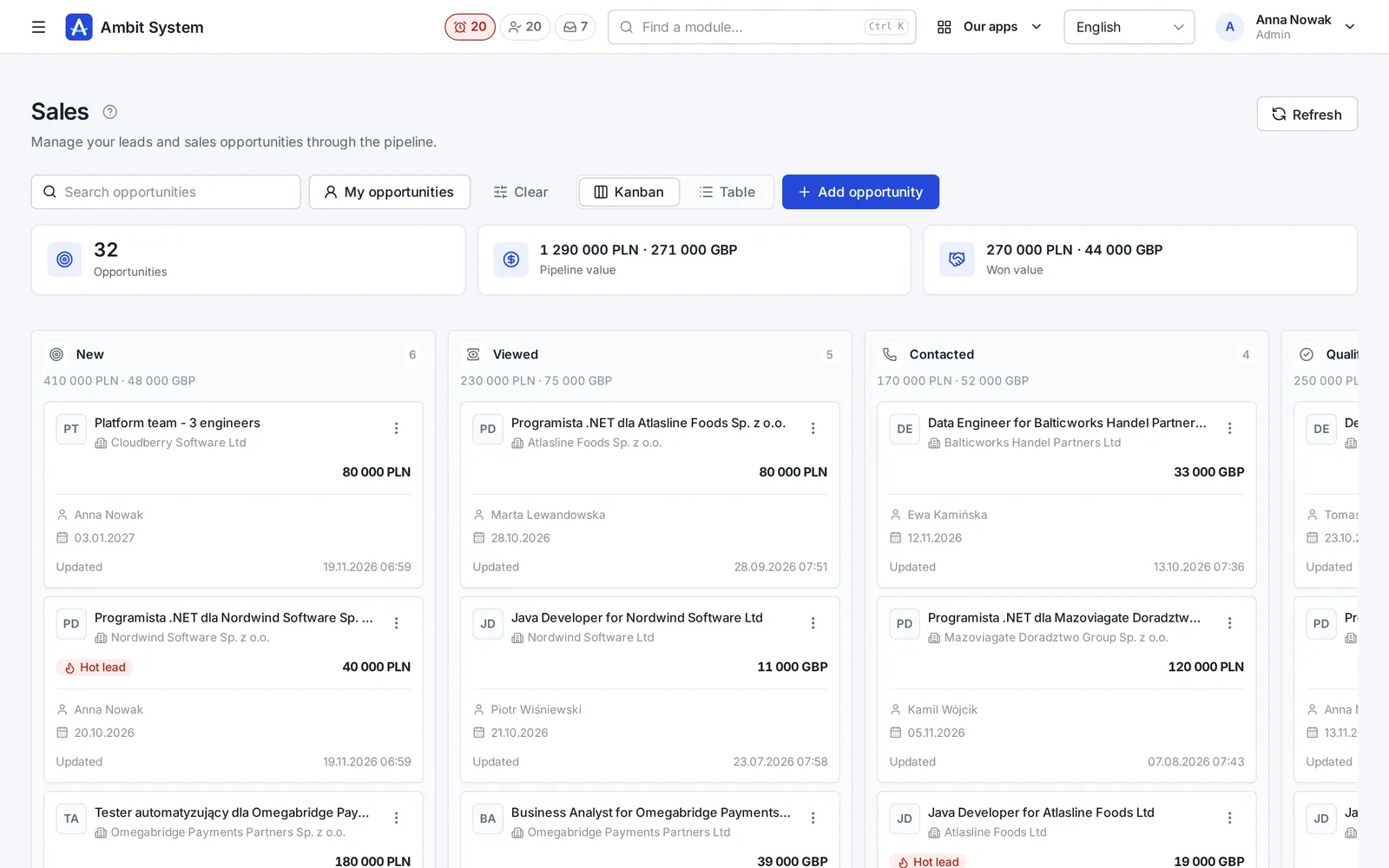
Clients and tasks come with every plan. The Sales module adds the pipeline: deals with their value, activities, the next step and the offers made for them.

  • A pipeline board from New to Won, with the value of every column
  • Calls, e-mails and meetings logged on the deal
  • Offers with a number and a PDF, made from the deal
See Sales on screenshots

Interviews and calls

Every conversation with a candidate, planned and in one place

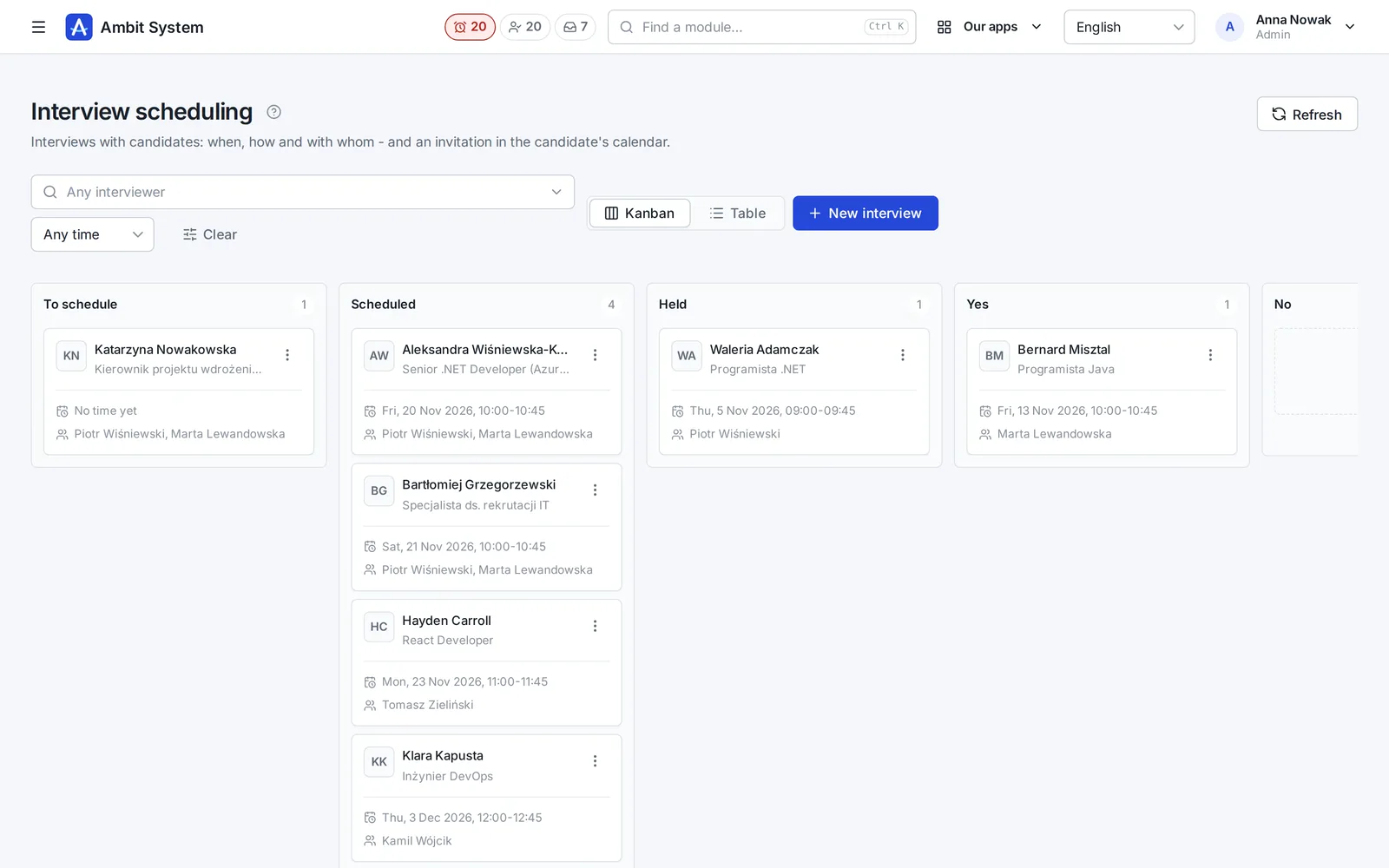
Interviews on a board with invitations, voice calls in the browser and the day's meetings on the phone.

  • Interviews from scheduled to decided, interviewers never booked twice
  • A call with a candidate from a link - nothing to install, nothing recorded
  • The Meetings app on the phone, with a reminder before each meeting
See interviews and calls on screenshots

Organization

Your company's shape - and its people's hours

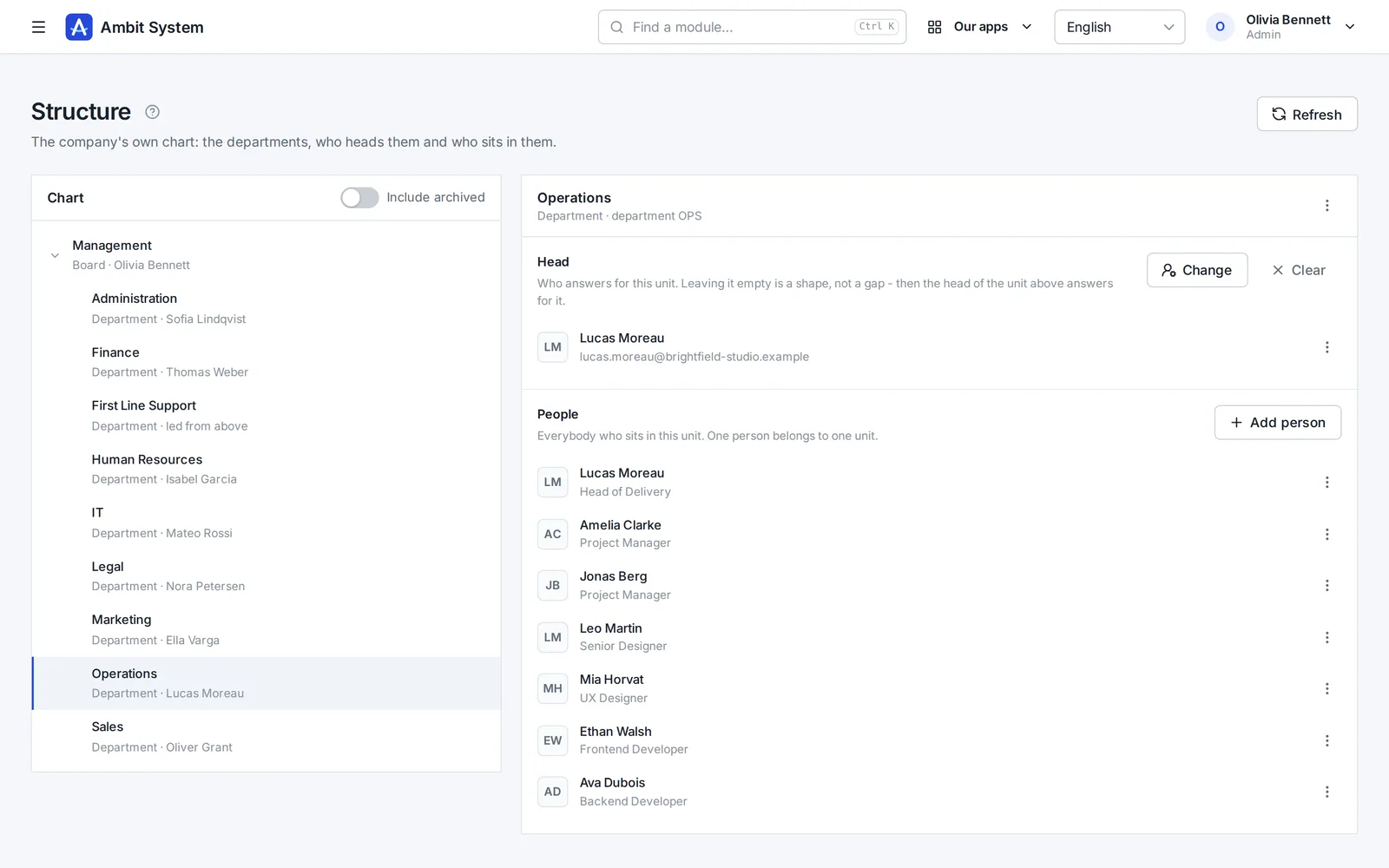
The org chart, the people and their access, the companies you trade through, and working time approved by the head the chart names.

  • An org chart of departments and sections, each with its head
  • Users with roles and teams, imported from a spreadsheet
  • Monthly time sheets approved by the person's head, ready for payroll
See the Organization on screenshots

KSeF and settlement documents

Every cost in one place - from KSeF and from outside it

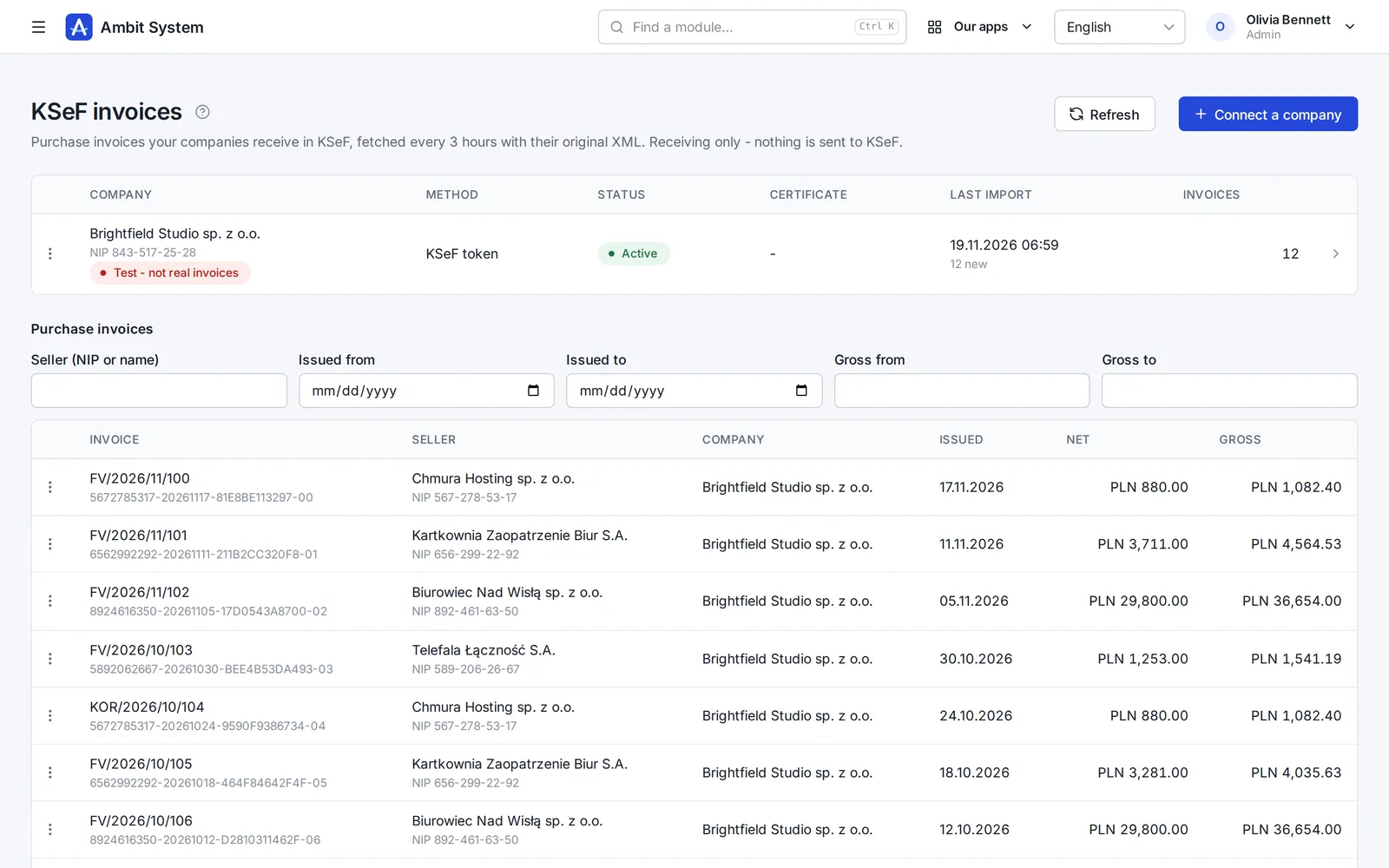
Purchase invoices arrive from KSeF on their own; foreign invoices, policies and bills go next to them, each with its due date.

  • Purchase invoices fetched from KSeF every 3 hours, with the original XML
  • Costs outside KSeF with their files, due dates and a paid flag
  • A reminder the day before a payment is due
See KSeF and settlement documents on screenshots

Hours and billing

From the hours at a client to the pro forma - without retyping

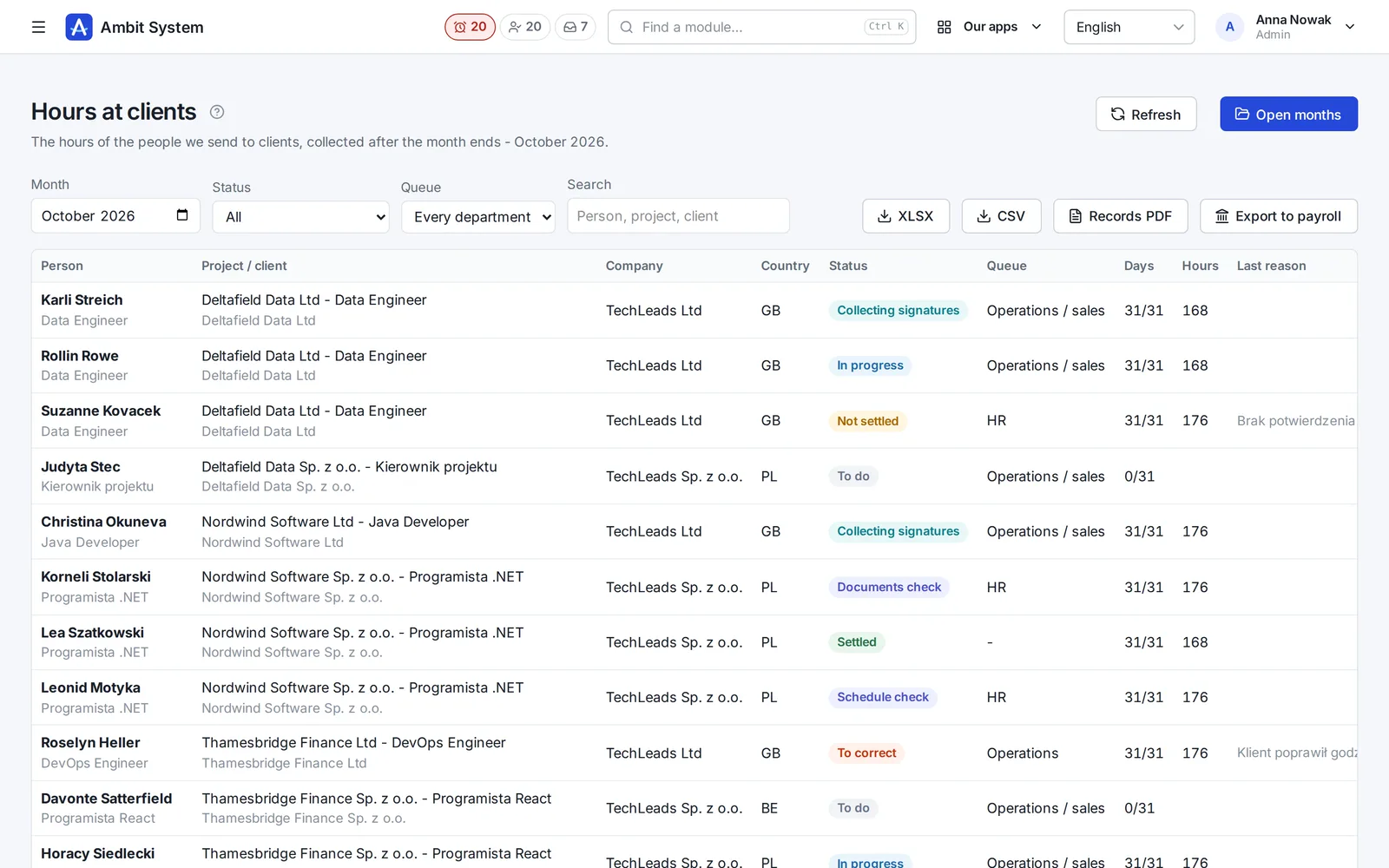
The client enters the hours through a link, the worker signs on a device, HR settles, and you prepare the pro forma from the settled month.

  • Hours at clients month by month, also through a link for the client
  • Documents to sign: on a device, by link or on paper
  • Rates, costs and margin, and pro formas for clients
See hours and billing on screenshots

Delivery

People at the client - legal, on time and with a roof over their heads

A project with its contract, the country's legal requirements, a worker with documents, a posting with A1 and Limosa, and a bed in an apartment - in one system.

  • Projects with their contract, contacts and documents
  • Legal requirements by country and engagement type
  • Apartments, rooms, beds and who lives where
See delivery on screenshots

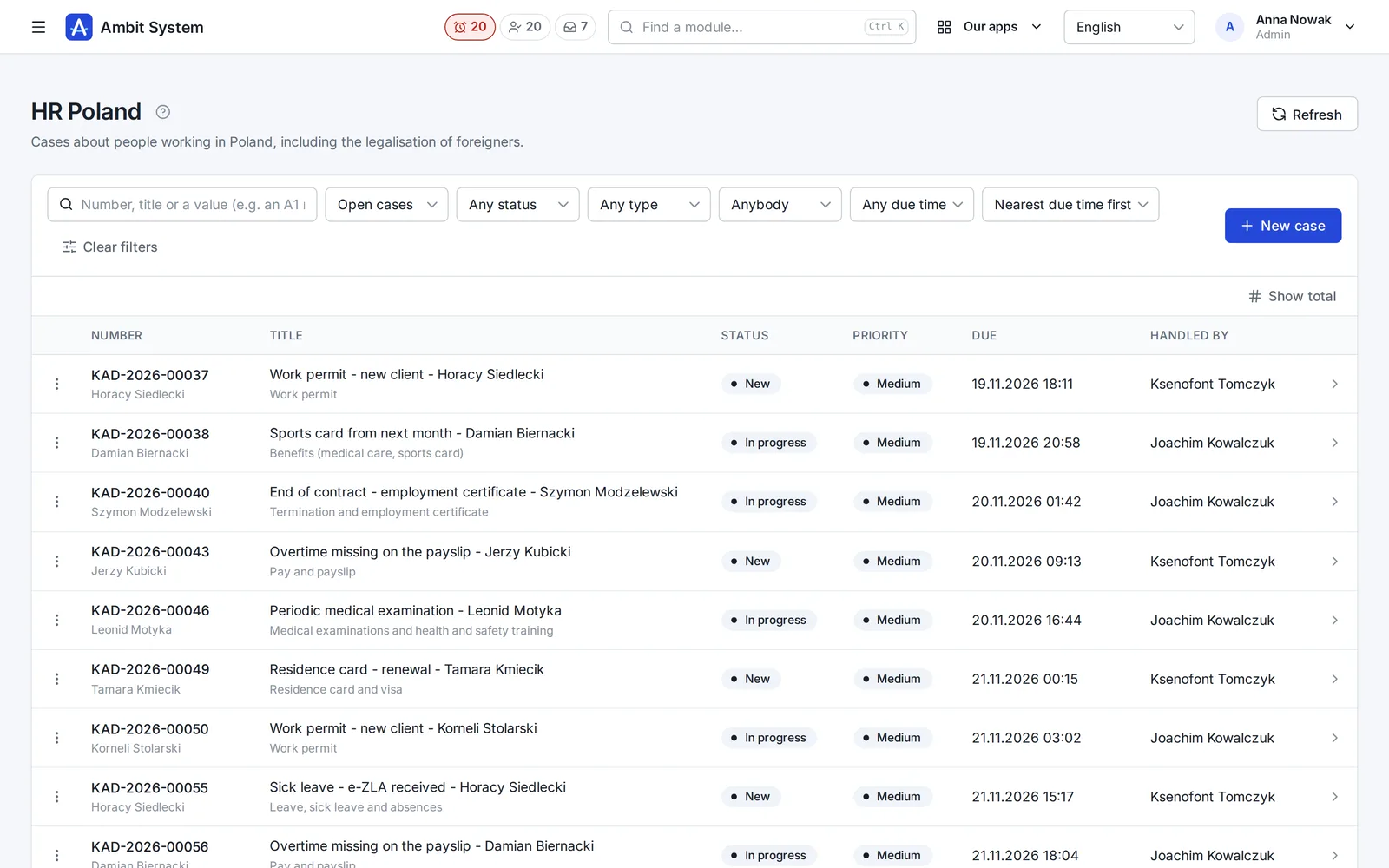
HR cases

Every HR matter has a number, an owner and a due time

Sick leave, a payslip question, a residence card, Limosa and A1 - opened as a case of its type, handled by HR and closed with its history.

  • HR Poland and HR abroad, each with its own list
  • A type with its fields, checked as they are typed - PESEL, dates, posting periods
  • Priority with an SLA, and the overdue ones visible at once
See HR cases on screenshots

Fill in with AI

A first draft of a job post, written for you to check.

In the job post and job description forms, in a sales offer's draft, on a wiki page and in an SDD spec, one button writes the texts from what the system already knows about the position and the client. Nothing is saved until you save the form.

What it does

  • A job post from its job description: summary, description, responsibilities, requirements and skills
  • A job description from the title and your notes from the client
  • A post translated into Polish, English, German or French, opened as a new post to check
  • A sales offer's introduction, terms and lines - without prices
  • A wiki page from your notes, or an SDD spec's scope and acceptance criteria
  • 1 to 3 credits a fill, by length; Undo puts back what you had

What it never does

  • Writes no salary and no price - those stay yours
  • Never reads candidates' data: no CVs, no applications, no messages
  • Is not a chat: one button, one form, one answer

What it looks like

The processes as the system runs them.

You will see the same stages in the panel. A step marked as manual is done by a person: the system will not do it by itself.

Recruitment

The job description is internal, the candidate sees the job post. An application moves through the stages from applying to being hired.

  1. Job description
  2. Job postsin many languages
  3. Candidate
  4. Applied
  5. Screening
  6. Interview
  7. Assessment
  8. Offer
  9. Hired

Off the main path: Rejected, Withdrawn

Sales and delivery

A won opportunity does not create a project by itself: you create the project by hand and can point it at the opportunity it came from.

  1. OpportunityNew ... Proposal
  2. Won
  3. Project: Draftmanual
  4. Activeafter the contract is signed
  5. Completed

Off the main path: Lost opportunity, Suspended, Cancelled

Worker

Each stage has its department. Legalisation applies only to people whose citizenship requires it.

  1. Recruitment
  2. Contract preparation
  3. Legalisationonly when needed
  4. Onboarding
  5. Employed

Off the main path: Project change, Terminated

Assignment, hours and pro forma

An assignment is one posting. Its hours are collected after the month and a pro forma comes from them. It is not a VAT invoice: that one you issue in KSeF.

  1. Assignment: Active
  2. To do
  3. In progressthe agency or the client by link
  4. Schedule check
  5. Collecting signatures
  6. Documents check
  7. Settled
  8. Pro formamanual

Off the main path: To correct, Not settled, Assignment: Completed, Interrupted, Did not start

Comparing fees

Your agency grows. The system's fee moves only every 1000 accounts.

With a per-person fee the bill grows with every hire. Here the price changes only every 1000 accounts. Move the slider and type the rate you know.

An example rate, not any vendor's price. Type your own.

A system with a per-person fee

1400 €

a month, net

Ambit System

450 €

a month, net

The company price is 950 € a month lower. The two bills meet at 65 people.

  • The formula: people times the fee per person, against the company price of the tier that holds that many accounts.
  • Only the fee for the system is compared, without implementation, add-ons or file storage on either side.
  • The slider ends at the system's limit of accounts.

Pricing

A price per company, in tiers of 1000 accounts.

No fee per user, recruiter or worker at a client: you only choose your tier of accounts.

450 €

net, a month, per company, up to 1000 accounts

BuyWrite to us

You buy online: pay by card through Paddle and the organization is ready at once. No fixed-term contract - cancel at any time. If a payment is late, your data does not disappear: export always works, and after you leave your data waits 90 days.

Included

  • Everything under “What it covers”, housing too
  • Accounts up to your tier; we move you up on request
  • 10 GB for files included, further 10 GB packs at 10 € net a month.
  • AI credits for "Fill in with AI": packs of 100 for 25 € net, paid once in the panel and never expiring.

Limits per organization

  • 5000 accounts
  • 5 000 000 candidates
  • 5 000 000 CRM clients
  • 300 000 positions
  • 300 000 projects
  • 300 000 KSeF invoices

Perguntas

Perguntas e respostas

Esta é a versão final do sistema?

Não. O sistema funciona, mas os planos são grandes e continuam a chegar funcionalidades novas. Dizemo-lo claramente, para que saiba o que está a comprar hoje.

Pago por pessoa?

Não por pessoa. Paga por empresa, conforme o seu escalão de contas: um preço até 1000 contas, e cada milhar seguinte é o escalão seguinte. Os trabalhadores nos clientes e os candidatos sem conta não custam nada. Também pode comprar mais espaço para ficheiros.

O que ainda falta no recrutamento?

Os anúncios não se publicam sozinhos nos portais: o sistema regista onde um anúncio foi publicado, e é o utilizador que o coloca lá. Não há SMS, nem sincronização com o calendário (as entrevistas têm um ficheiro .ics), nem IA a ler currículos.

O que já funciona para os dados dos candidatos?

Currículos em PDF verificados por antivírus, um registo de consentimentos, prazos de tratamento, um extrato dos dados de uma pessoa e o apagamento dos dados. O apagamento automático fica desligado até a organização definir os seus prazos.

Uma oportunidade ganha cria um projeto sozinha?

Não. O projeto é criado manualmente e pode indicar a oportunidade de que surgiu.

Uma pró-forma substitui uma fatura?

Não. Uma pró-forma não é uma fatura com IVA: a agência emite a fatura no KSeF. O sistema também não é contabilidade.

Existe integração com o Comarch Optima?

Sim, através de um agente instalado no computador com o Optima: o Ambit envia para o Optima os trabalhadores e os descontos de cada mês, e o agente lê de lá as empresas e as componentes de desconto. Os processamentos salariais e os pagamentos continuam a ser calculados no Optima.

Em que difere da versão geral do Ambit System?

A versão geral são módulos à escolha, para qualquer empresa. Aqui compra o conjunto: os mesmos módulos mais vendas, recrutamento, pessoas nos clientes, destacamento, alojamento, horas e faturação a clientes.

Como se compra?

Online: na página de preços escolhe o seu escalão de contas e o período, paga com cartão através da Paddle, e a organização fica pronta de imediato. Pode ver primeiro a demo. Preços

O que é a Paddle.com e como funciona o pagamento?

A Paddle.com é a empresa que vende o nosso sistema em nosso nome - muitas empresas de software usam-na. O pagamento só é possível através da Paddle.com - não assinamos contratos à parte nem emitimos faturas próprias. Paga lá com cartão, PayPal, Apple Pay ou Google Pay, e a sua organização fica pronta logo após o pagamento. A fatura com o IVA do seu país é emitida pela Paddle. A subscrição renova-se sozinha todos os meses ou todos os anos até a cancelar: pelo link no e-mail da Paddle ou escrevendo-nos, e o sistema continua a funcionar até ao fim do período pago.

Existe um acordo de subcontratação de dados (RGPD)?

Sim. O acordo de subcontratação faz parte dos termos (secção 12) e aplica-se desde a compra, sem nada à parte para assinar. Os seus dados estão na União Europeia, num centro de dados em Varsóvia.

Têm um SLA ou a ISO 27001?

Um SLA, sim: uma avaria crítica - o sistema indisponível ou uma função essencial sem funcionar para ninguém - é resolvida em 3 horas (8:00-22:00, hora da Polónia), e uma da noite de manhã, até às 11:00, todos os dias; está nos termos (secção 10). O estado do sistema é público em status.ambitsys.eu. A ISO 27001 ainda não temos - a página de Segurança diz o que existe hoje e o que não existe. Segurança

A minha equipa pode iniciar sessão com Microsoft 365 ou Google Workspace?

Sim. Um administrador liga ele próprio o início de sessão da sua empresa - Microsoft 365, Google Workspace, Keycloak ou outro fornecedor OpenID Connect - nas Definições, sem a nossa ajuda; os passos para cada fornecedor estão na página. A sua equipa inicia sessão com a conta de trabalho através da ligação própria da sua organização. Só entram as pessoas que adicionou, a menos que permita criar uma conta no primeiro início de sessão para endereços dos domínios de e-mail da sua empresa.

Como funcionam os créditos de IA?

«Preencher com IA» custa de 1 a 3 créditos por preenchimento, conforme o comprimento do que escreve - uma tradução, conforme o comprimento do resultado. Uma resposta que a IA recusou, ou sem nada aproveitável, não custa nada. A versão de RH compra no painel pacotes de 100 créditos, pagos uma vez; nunca expiram. O botão mostra quantos créditos restam, e um administrador vê o uso dos últimos 30 dias na página do plano.

Security

We say what is there, and what is not yet.

Two-step sign-in, the history of every change, each organization's data apart, data extract and erasure.

See it on a sample agency's data.

The demo opens at once, with no sign-up: a made-up company with thousands of records.